What components does this change affect?
This change affects implementations of the page layout from the Design System.
Implementation note
This change requires a manual update to the application HTML/layout and is not automatically applied through the Turas Design System NuGet or NPM packages.
HTML structure changes:
- The <main id="maincontent"> landmark has been moved so that it appears after the closing </header> landmark.
Header landmark in the UI
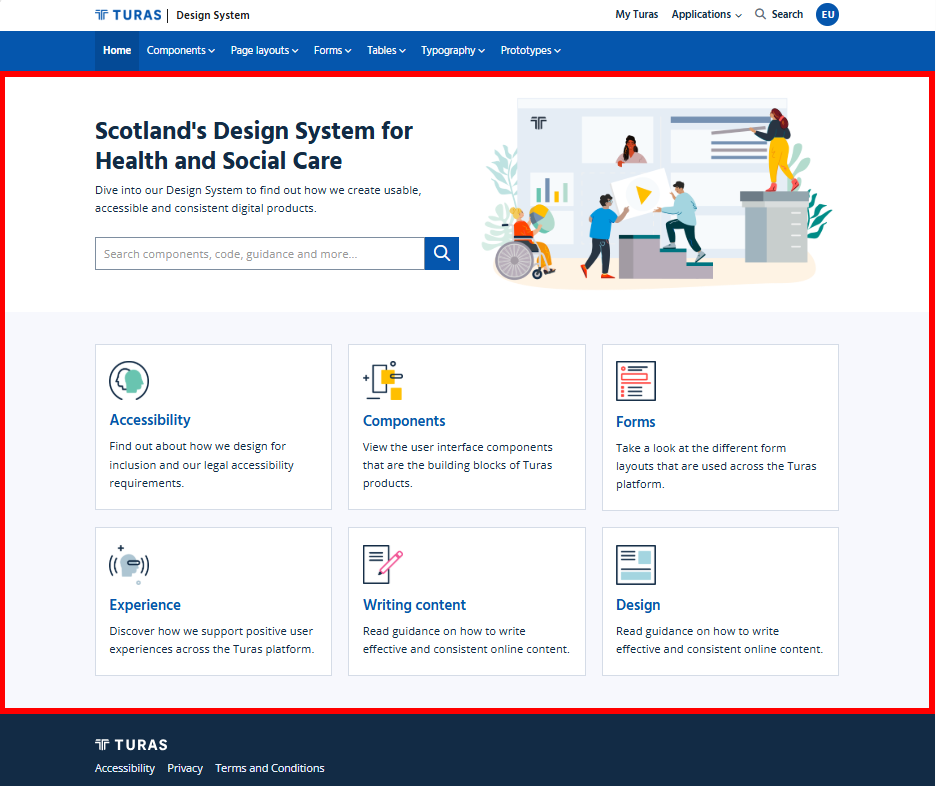
The <main landmark now starts immediately after the <header landmark.
The following screenshot highlights the area covered by the <main landmark:
Before
<partial name="_pageBanner" />

@if (IsSectionDefined("WideAboveContainer"))
{
    <div id="wideabovecontainer">
        @RenderSection("WideAboveContainer", required: false)
    </div>
}

<main id="maincontent">
....
</main>
After
</header>
<main id="maincontent">

    <partial name="_pageBanner" />

    @if (IsSectionDefined("WideAboveContainer"))
    {
        <div id="wideabovecontainer">
            @RenderSection("WideAboveContainer", required: false)
    }

   ...
</main>
Why this change was made
This change ensures that the page's main content landmark correctly follows the header and navigation landmarks in the page structure.
This provides a clearer semantic structure for assistive technologies and allows users to navigate between the site's header/navigation and main content more predictably.
Benefits include:
- improved landmark structure
- clearer separation between navigation and main page content
- improved navigation for users of assistive technologies
Recommended checks for consuming teams
After making the HTML change, we recommend reviewing the page structure in your application.
Areas worth checking:
- the <main id="maincontent"> landmark appears immediately after the closing </header>
- page banner and other main-page content remain inside the <main id="maincontent"> element
- existing page layout and styling remain unchanged
- keyboard and assistive technology navigation continues to work as expected
- no application-specific CSS or JavaScript relies on the previous position of the <main id="maincontent"> element
Summary
This change repositions the <main id="maincontent"> landmark so that it follows the page header and navigation, providing a clearer semantic structure for assistive technologies.
The change requires a manual update to consuming applications and is not automatically applied through the Design System packages.
Internal reference
Design System internal reference: 102011